Kevin Liedtke
Labs-as-a-Service Platform
A self-service portal designed to give engineers and lab staff controlled access to hardware for Ethernet validation, transforming scattered manual workflows into an efficient, modular system.
At a Glance
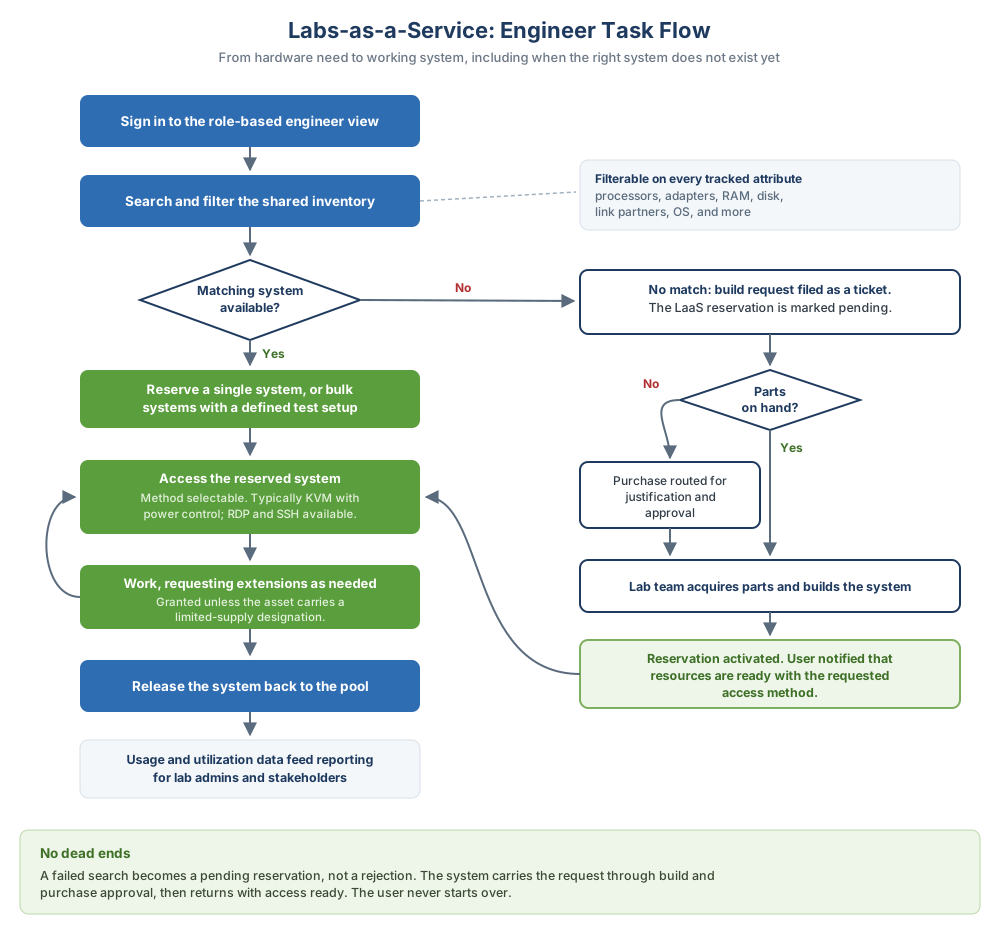
The move: stop tracking lab hardware by ticket and spreadsheet, and give every role, engineer, admin, and stakeholder, one shared, self-service view of the same pool.
The Challenge: Fragmented Lab Access & Resource Waste
When COVID-19 disrupted lab access, validation engineers were left without a way to continue critical hardware testing. Labs-as-a-Service was created to support remote reservation, configuration, and monitoring of lab systems while reducing support burden and hardware waste.
Manual and ad hoc
Hardware was reserved through manual ticketing and spreadsheets, with no shared source of truth.
Siloed ownership
Idle or duplicated systems accumulated because each team owned and tracked hardware independently.
No shared visibility
There was no shared inventory or usage data, so nobody could see what was already available.
Reinvented per team
Every team built and maintained its own workflow for the same underlying problem.
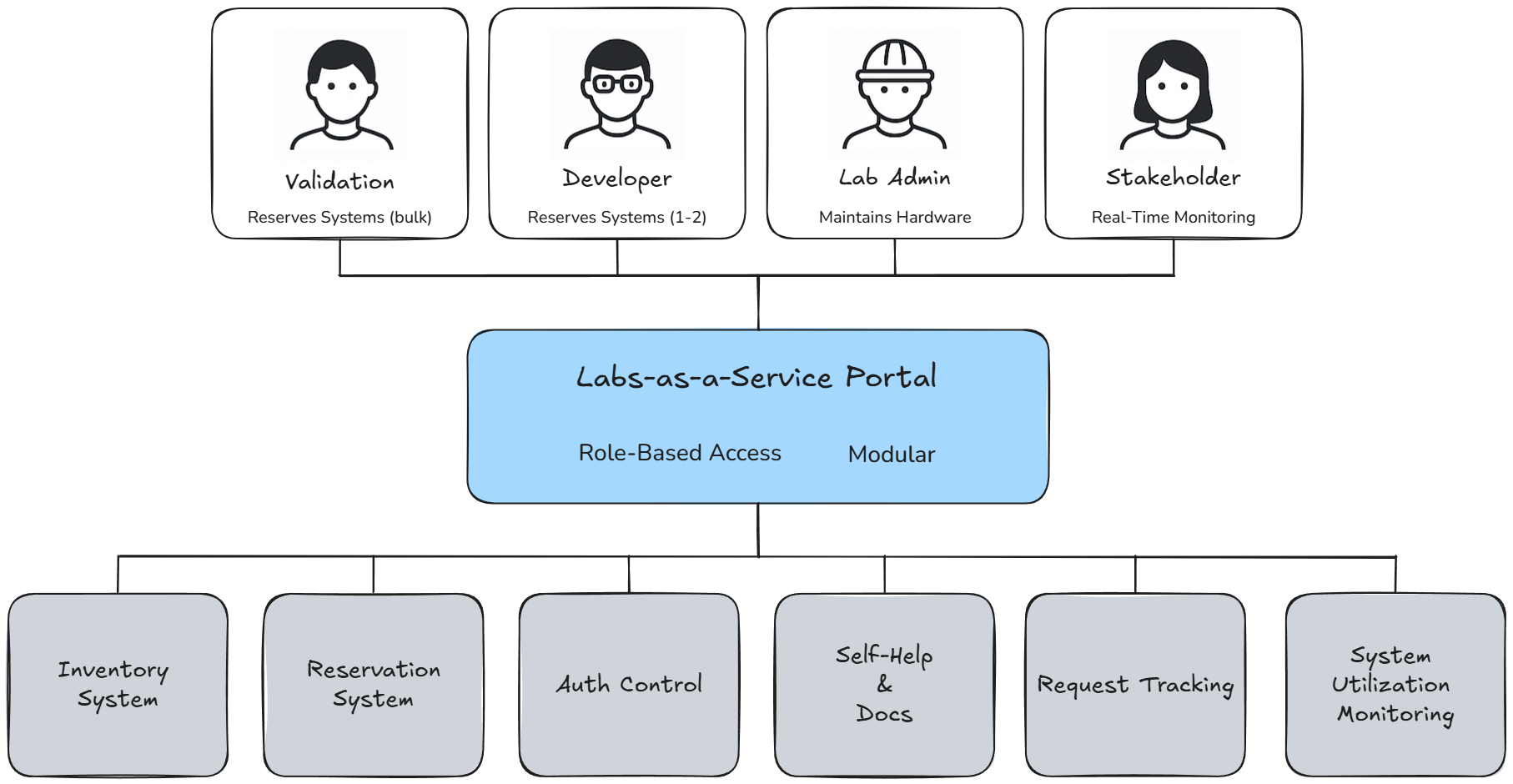
Four groups depended on getting this right: QA engineers needed bulk reservations of hardware with specific test setups, developers needed quick access to one or two systems for feature work, lab admins needed full inventory visibility to maintain hardware, and stakeholders needed usage data for planning and budgeting. None of them had a shared way to get it.
My Role: Systems Architect & UX Lead
- Defined the system architecture and role-based access model for the portal.
- Led UX research and design, including user interviews, task flows, Figma mockups, and final UI specs.
- Collaborated with validation teams, lab techs, and a principal architect to align backend constraints with front-end design.
- Established accessibility and layout standards for a modular, multi-role interface.
Approach: A Modular, Role-Based Portal
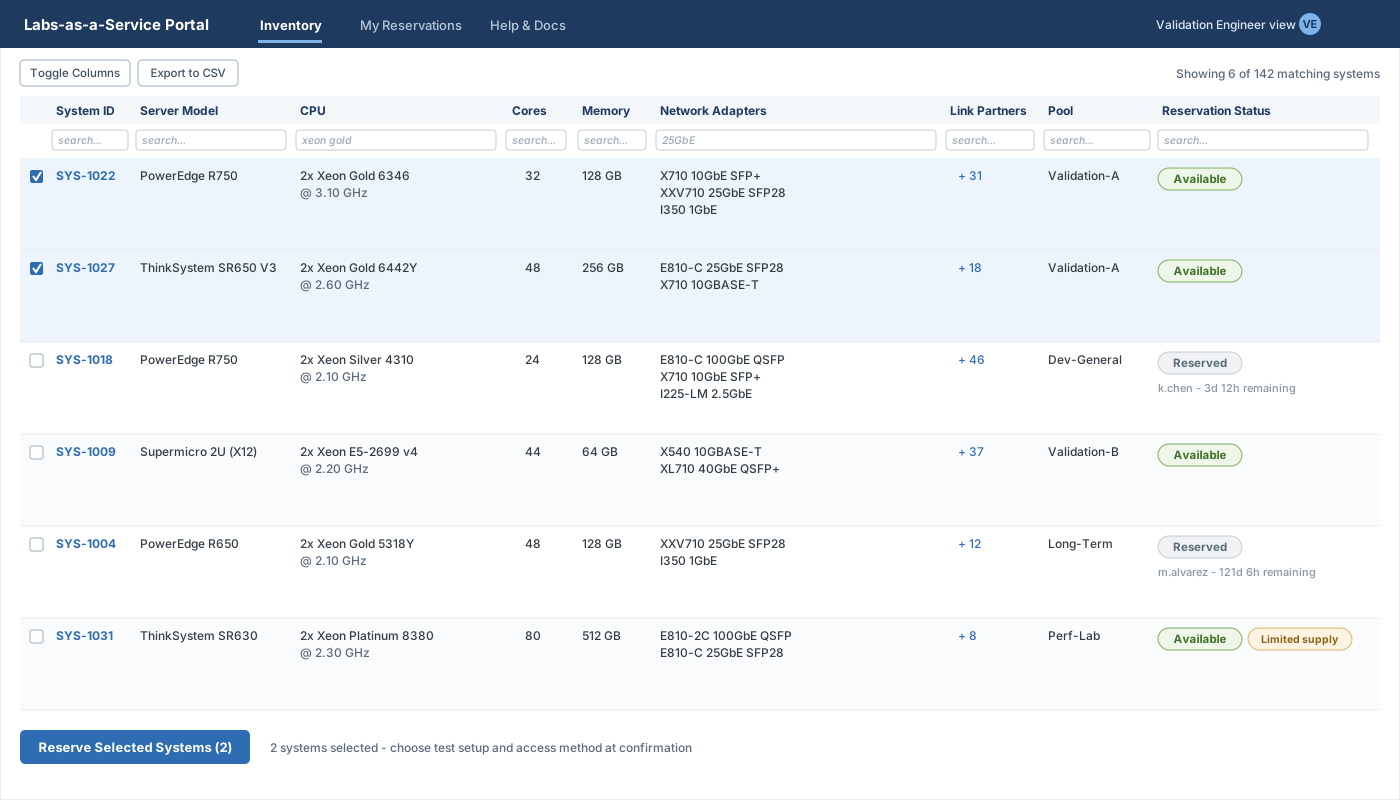
The portal centralized lab hardware management behind a modular, role-based UX organized around what each user needed to do, not how the lab was organized internally or who owned which hardware. I mapped the full workflow from request through reservation, access, servicing, release, and reporting, which exposed where tickets, spreadsheets, and tribal knowledge were creating friction, then separated self-service tasks from admin controls so engineers could move quickly without generating more support burden.
Key tradeoffs:
Simple surface, real constraints
The interface stayed simple on the surface while still respecting backend realities: system pools, permissions, hardware configuration, servicing status, and utilization reporting.
Fast access, retained control
Developers got fast self-service access without removing the control lab admins needed to manage shared resources responsibly.
Shared views, not clutter
Inventory and reservation views served multiple teams at once without turning the portal into a cluttered admin console.
Results & Impact
Before the Portal
- Email tickets for lab access.
- Manual spreadsheet lookups.
- Ad hoc scripts and tribal knowledge.
- Support required for routine provisioning.
- Unused hardware held due to poor visibility.
After the Portal
- Centralized self-service access.
- Current inventory and reservation status.
- Pre-configured test setups.
- Embedded help for common workflows.
- Shared pool with clear utilization visibility.
- Cut support tickets and routine lab-access time by an estimated 30% through self-service workflows.
- Improved hardware visibility and reuse through shared inventory and reservation history.
- Enabled data-driven planning through utilization insights for stakeholders and lab admins.
Stakeholder Feedback
“This system is a game-changer. Finally we have visibility into our hardware and a seamless way to manage it.”
“The modular UX made it easy for engineers and admins alike, no extra training needed.”